
BOOKING LITE · FAV FOR SERVICE BUSINESSES
Bookings,made simple.
An online booking system for your business. Set your services and hours, let customers pick a time, and get on with the work.
This Hong Kong offer gives you one free month with no card at signup. Nothing is charged unless you explicitly authorise a subscription.
For studios, tutors, beauty and service businesses
FROM SETUP TO BOOKINGS
Your business, arranged around bookings.
You don't need to configure a whole system first. Start with one service, then add the rest and open up your hours.
Create your service
Add a name, duration and price. Free services are fine too.
Set bookable hours
Choose the days and times each service is available.
Share the booking page
Customers pick a time on their phone. New bookings are confirmed automatically and appear in your agenda.
THE BOOKING BASICS
From setup to booked.
The things you need every day — services, availability, bookings and payment status — in one place.
Schedule around your services
Create multiple services, each with its own name, duration, price and weekly availability. Free services work too.
- A separate schedule for each service
- Set days off and bookable windows
Customers book themselves
Guests can book without creating an account, and new bookings are confirmed automatically by default. No back-and-forth for every slot.
- A booking page that works on a phone
- Guest booking with automatic confirmation
See the day at a glance
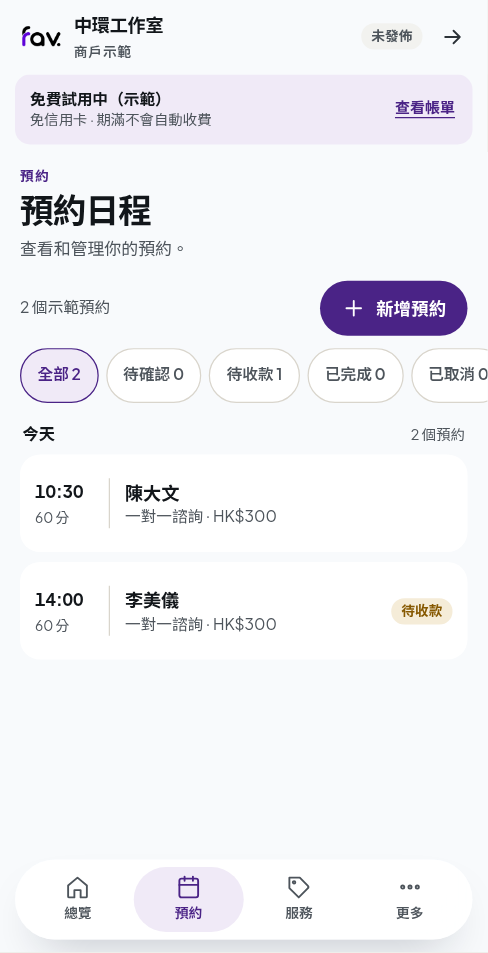
See the customer, service and time in your agenda, then cancel, mark complete or mark no-show as needed.
- Automatic confirmation in the agenda
- Booking details and customer context
Track payment separately
Take cash, FPS or PayMe on site and record it manually. A confirmed booking is not a paid booking. If you want online payments, connect Stripe Connect separately — it is independent of your subscription authorisation.
- Unpaid and paid status
- Online customer payments are optional
Your plan and trial, in one place
See the trial dates and choose monthly or yearly. If the trial ends without a subscription, new bookings pause — you can still sign in and manage existing bookings.
- No charge during the trial
- Existing bookings stay accessible
SIMPLE PRICING
Try it first. Then decide.
Start the Hong Kong offer with one free month and no card at signup. Choose monthly or yearly when you register.
For this Hong Kong offer, the free trial runs for one calendar month from account verification in Asia/Hong_Kong; the server records the end instant. If that month has no matching day, it ends on the last day of the month. Nothing is charged during the trial. Only when you explicitly authorise a subscription will the first charge be taken for the cycle you chose, then renew automatically. If you authorise before the trial ends, the first charge waits until the trial ends; even an authorisation in the final 48 hours is not charged early. You can cancel before the next renewal.
Registration and checkout show the first charge, renewal cycle and cancellation terms. You authorise the subscription after reviewing them.
BEFORE YOU START
Common questions
Will I be charged automatically when the trial ends?
Only if you authorise a subscription. No card is required at signup; if you authorise during the trial, the first charge is due after it ends, followed by automatic renewal on your chosen cycle.
How is the trial period calculated?
It runs for one calendar month from account verification in Asia/Hong_Kong. If that month has no matching day, it ends on the last day of the month. Nothing is charged during the trial.
What happens if the trial ends without a subscription?
New bookings pause. You can still sign in and view or manage existing bookings; your bookings and customer records are not removed.
How do customers pay?
The plan is built around paying on site: take cash, FPS or PayMe and record it manually. If you want online payments, you can connect Stripe Connect separately. That is optional and independent of your Booking Lite subscription authorisation.
Do customers need an account to book?
No. Guests can book without an account, and new bookings are confirmed automatically by default.
I already have a Fav merchant account. Can I use it?
This self-serve signup requires an email that is not already used for a Fav merchant account, and the plan cannot currently be added to an existing account. If you want to keep your existing account, contact us first to discuss the available options.
READY WHEN YOU ARE
Set up your first service.
The booking system, merchant management and the customer page, in one flow.